
BookingMachine
Help Center
Getting Started
Core Features
Payments & Analytics
Team & Scheduling
Integrations
Getting Started
Welcome to BookingMachine
BookingMachine is a booking widget platform for service businesses. Learn how widgets, services, pricing, bookings, and reviews work together.
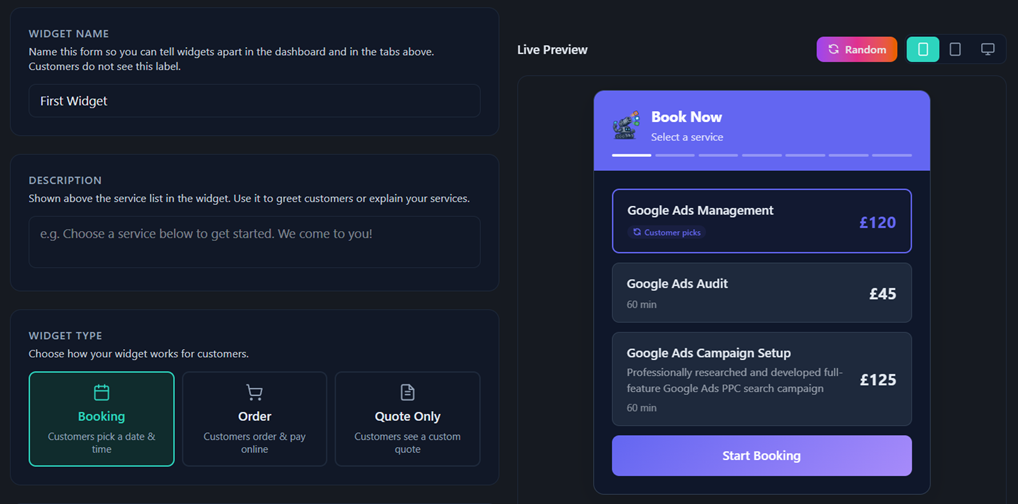
BookingMachine helps service businesses turn their website, social media, and marketing into a booking engine.
Easily build custom booking, quote, and order forms that can be embedded anywhere or shared with a simple link. Take deposits or full payments online and automatically request reviews once the job is complete.
Booking Widget First
Most business software focuses on what happens after a customer makes contact.
CRMs, lead funnels, invoicing tools, schedulers, and admin systems all serve an important purpose. But they're invisible to customers and rarely influence whether someone chooses to buy from you.
We believe the most important moments happen before and after the sale:
The moment a customer is ready to request a quote, place an order, or book a service.
The moment you've successfully delivered the product or service.
That's why BookingMachine is built around the booking widget.
Whether a customer finds you through your website, social media, QR code, ad campaign, or direct link, the widget becomes the connection point between your business and your customer.
From that single interaction, BookingMachine can generate quotes, orders, bookings, payments, invoices, customer records, and automated workflows.
When the job is complete, BookingMachine automatically follows up with review requests, allowing customers to leave text, photo, and video reviews.
The result is a simple growth flywheel:
Discover → Quote → Book → Deliver → Review → More Customers → Quote → Book
Core concepts
A handful of building blocks power everything else. Once these click, the rest of the help center will make sense quickly.
Workspace
Your business account. Every service, customer, booking, and setting lives inside a workspace. You can run more than one business from a single login and switch between them.
Services
What you sell. Each service has a price and, optionally, a duration. Scheduled services take a time slot; services with no scheduling are sold as orders instead.
Pricing dimensions
The variables that change a price — size, distance, vehicle type, number of rooms, and so on. Each option carries a multiplier the quote applies in real time.
The widget
An embeddable booking form you add to any website with one line of code. It runs in its own isolated frame so it can't clash with your site's styling.
The booking link
A hosted booking page at your own BookingMachine URL. Share it in your Instagram bio, by text, or as a QR code — no website required.
Customers (built-in CRM)
Every quote, booking, and order automatically creates or updates a customer record, so you never lose a lead and can see each customer's full history.
How the pieces fit together
You set things up in the dashboard
Add your services and prices, build any pricing dimensions, set your hours, and connect Stripe to take payments.
Customers book through the widget or your link
They pick a service, see a live quote, choose a time (for scheduled services), enter their details, and pay — a deposit or in full, depending on your settings.
You manage everything back in the dashboard
New bookings, quotes, orders, customers, payments, and reviews all flow into the same place. Email notifications and confirmations are sent automatically.
Bookings, orders, and quotes
BookingMachine handles three closely related things, and the wording adapts to your business:
Booking — a service scheduled for a specific date and time.
Order — a service or product sold without a time slot (no scheduling).
Quote — a priced proposal you can send for approval before any time or payment is committed.
If all of your active services have no scheduling, BookingMachine switches its wording to "order" language throughout. Mixed or appointment-based businesses keep the booking wording.
Where to go next
Set up your business: the onboarding wizard
Build what you sell: services and pricing dimensions
Get bookings coming in: embed the widget or share your booking link
Find your way around: the dashboard tour
FAQ
Do I need a website to use BookingMachine?
No. Every workspace gets a hosted booking link you can share anywhere, including your social media bio, email signature, text messages, WhatsApp, or as a QR code. If you have a website, you can also embed the widget directly.
What's the difference between a booking, order, and quote?
A booking includes a scheduled date and time. An order is sold without scheduling. A quote is a priced proposal that can be approved before any booking or payment is made.
Can customers pay online?
Yes. You can collect deposits, full payments, or no payment at all, depending on how your business operates.
Can I offer recurring services and subscriptions?
Yes. BookingMachine includes advanced recurring booking and billing tools for businesses that serve customers on an ongoing basis. Customers can book recurring appointments, while BookingMachine automatically manages future bookings, invoice generation, payment collection, reminders, and subscription billing. Recurring schedules can be paused, resumed, updated, or cancelled at any time.
Can I customize the booking widget?
Yes. You can choose which services appear, add custom questions, upload your logo, change colours, and control how the booking flow works.
What types of businesses can use BookingMachine?
BookingMachine works for most service businesses, including cleaners, landscapers, consultants, pet grooming, agencies, beauty professionals, tradespeople, photographers, coaches, and many others. However you can also use BookingMachine to sell physical and digital products.
Do I need separate software for CRM or customer management?
No. Every booking, order, and quote automatically creates or updates a customer record, giving you a complete history of interactions with each customer.
What happens after a booking is completed?
You can set your workspace to automatically send review requests after a service is complete or the jobs delivered, helping you collect text, photo, and video reviews from customers.
Can I customize the booking widget?
Yes. You can choose which services appear, add custom questions, upload your logo, change colours, and control how the booking flow works.
Still have questions? Contact support