Help Center
Getting Started
Core Features
Payments & Analytics
Settings
Team & Scheduling
Integrations
White-Label
Reference
Billing & Plans
Plan comparison, pricing, upgrading, downgrading, and subscription management.
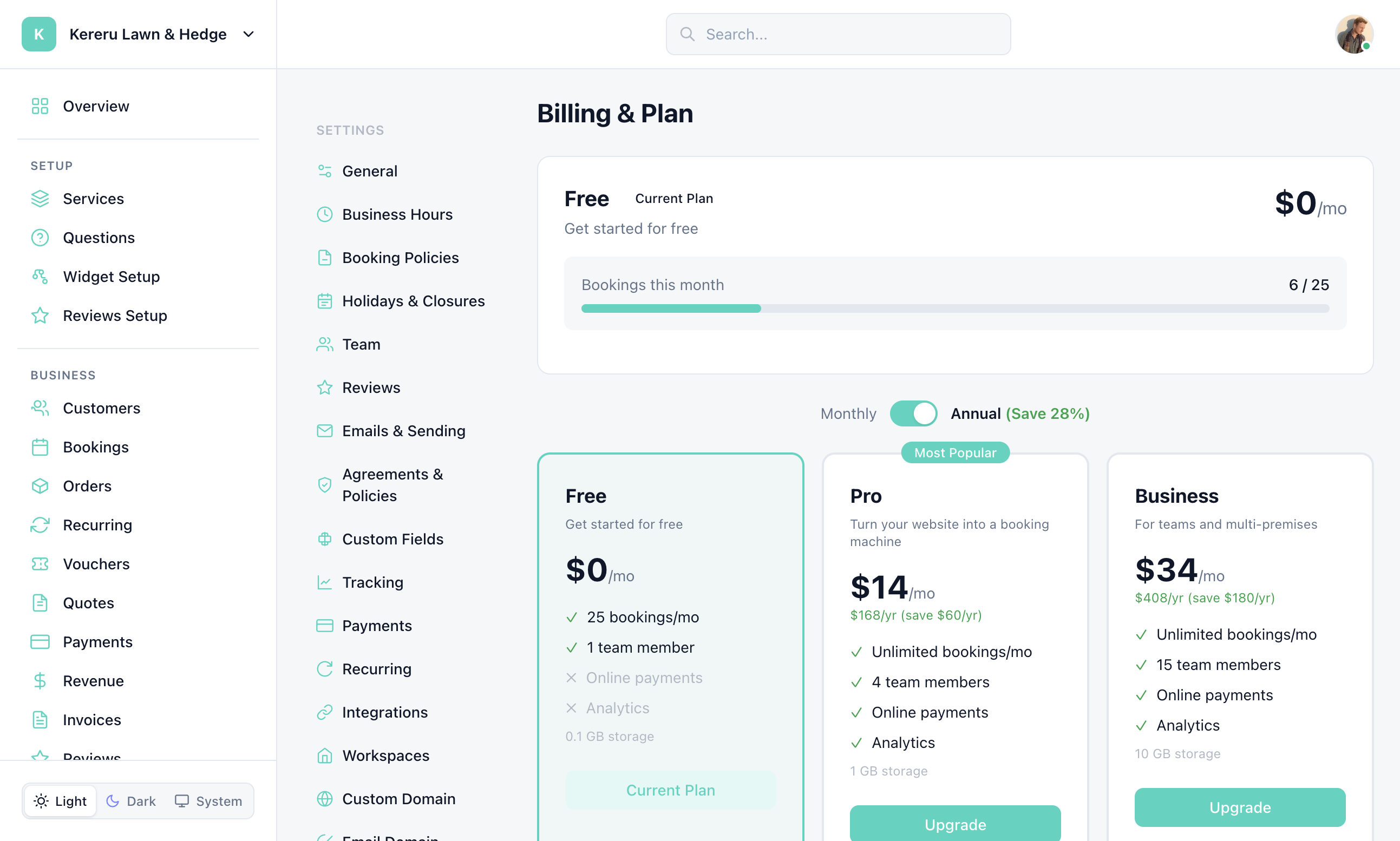
Manage your subscription at Settings > Billing & Plan (the old /dashboard/billing URL redirects here).
Plans
| Free | Pro | Business | |
|---|---|---|---|
| Price (monthly) | $0 | $24/mo | $49/mo |
| Price (annual) | $0 | $18/mo ($216/yr) | $34/mo ($408/yr) |
| Bookings / month | 25 | Unlimited | Unlimited |
| Team members | 1 | 4 | 15 |
| Locations | — | 2 | 6 |
| Widgets | 1 | 3 | 25 |
| Photo storage | 102 MB | 1 GB | 10 GB |
Feature Comparison
Copied from the Full Feature Comparison table on Settings > Billing & Plan:
| Feature | Free | Pro | Business |
|---|---|---|---|
| Online payments (Stripe) | — | Yes | Yes |
| Recurring bookings | — | Yes | Yes |
| Voucher / discount codes | — | Yes | Yes |
| Quotes & invoices | Yes | Yes | Yes |
| Custom document terms | — | Yes | Yes |
| Analytics dashboard | — | Yes | Yes |
| Advanced analytics | — | Yes | Yes |
| Cross-vertical benchmarks | — | — | Yes |
| Priority support | — | — | Yes |
| Powered by badge | Yes (removable on Pro+) | Removed | Removed |
| White-label | — | Yes | Yes |
| Custom domain | — | Yes | Yes |
| Google Calendar sync | — | Yes | Yes |
| Microsite | Yes | Yes | Yes |
| 1-to-1 setup & on-call support | — | — | Yes |
Upgrading
Go to Billing & Plan
Open Settings > Billing & Plan.
Choose a plan
Select Pro or Business. Toggle between monthly and annual billing.
Enter payment details
Pay via credit card through Stripe. Your new features are available immediately.
Downgrading
You can downgrade at any time from Settings > Billing & Plan. When you downgrade:
Your current plan continues until the end of the billing period
Features above your new plan's limits become read-only
All your data, bookings, and customer records are preserved
Team members above the limit will lose dashboard access but their data remains
Annual Billing
Save 28% with annual billing. On Settings > Billing & Plan the toggle is labeled Annual (Save 28%):
Pro: $18/mo billed as $216/year (save $72/yr vs monthly)
Business: $34/mo billed as $408/year (save $180/yr vs monthly)
Switch between monthly and annual at any time. When switching to annual, you're charged the annual rate immediately. When switching to monthly, it takes effect at the next billing cycle.
Cancellation
Cancel your subscription at any time from Settings > Billing & Plan. Your account reverts to the Free plan at the end of the current billing period. All your data is preserved — you can upgrade again later without losing anything.
Still have questions? Contact support