Help Center
Getting Started
Core Features
Payments & Analytics
Settings
Team & Scheduling
Integrations
White-Label
White-Label
Website Domain & Search
Your site on your own domain, and how it shows up on Google.
Your website is built to be found. Every page has a proper title, description, canonical link and share image, every service has its own page, and the site publishes its own sitemap and structured data — without you doing anything. This page covers what you can tune, and how to put the site on your own domain.
Titles and descriptions
Select a page and open the Page tab. Under Search & sharing you can set the page title (what Google and the browser tab show), a one- or two-sentence description, and a share image for social links. On Pro these are editable per page; otherwise the sensible defaults apply.
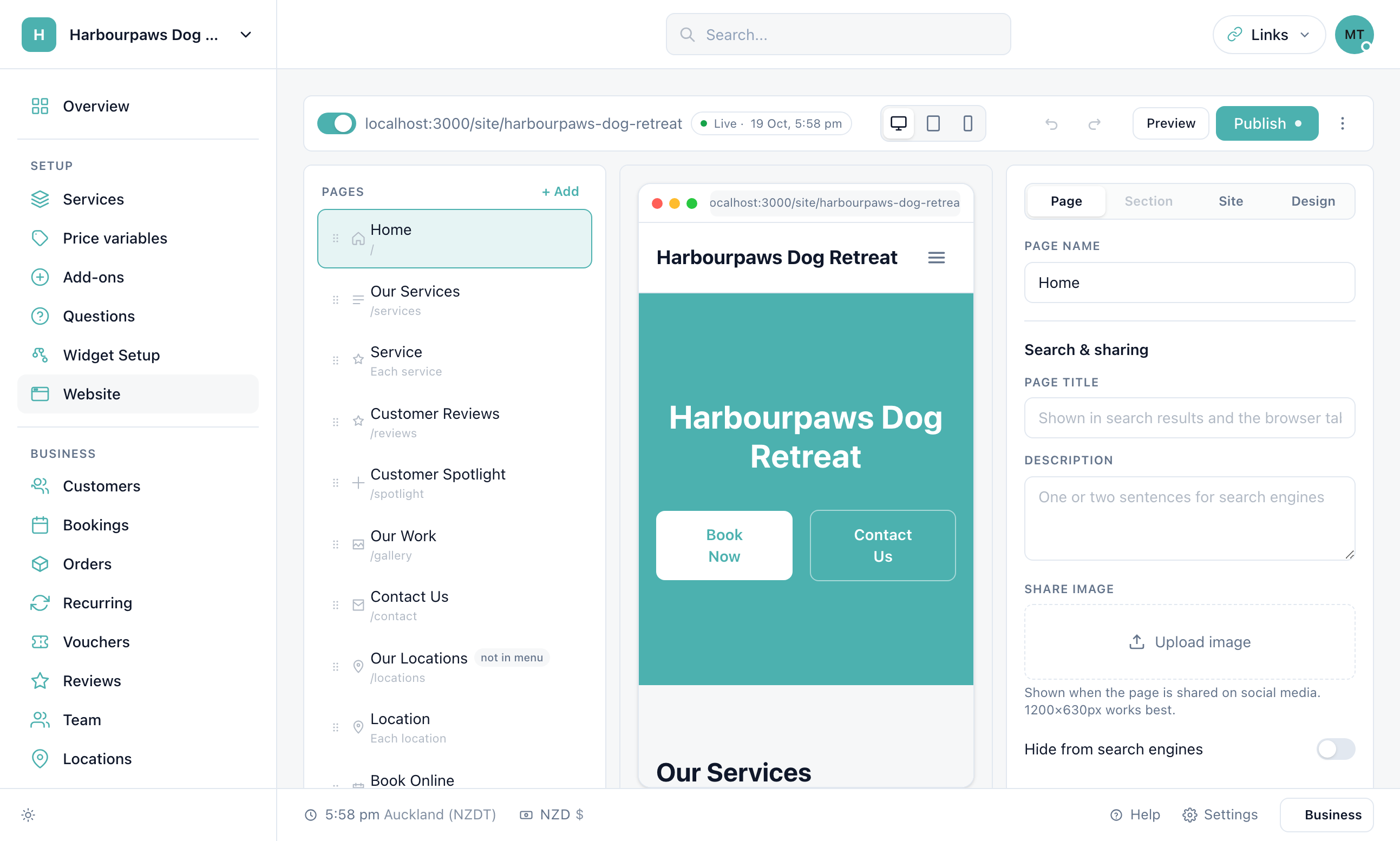
Each service page has its own title, description and share image too, under Pages > Service > This service — write them in the words customers search for ("mobile car valeting in Leeds"), not just the service name.
What happens automatically
A page per service at /services/<name>, with the price, duration, add-ons, your write-up and FAQ, plus Service and FAQ structured data.
LocalBusiness structured data on every page: name, phone, address, opening hours and your review rating.
A sitemap at /sitemap.xml listing every live page and service, and a robots.txt that points search engines at it.
Share images — a branded card for any page without its own image, so links look right on WhatsApp, Facebook and LinkedIn.
Pages you switch off, or mark Hide from search engines, are left out of the sitemap and marked no-index.
Your own domain
On Pro you can serve the whole site from yourbusiness.com (or www., or book.). One CNAME record, then SSL is issued for you; every link and canonical address switches to the domain, and the bookingmachine.io address keeps working as a backup. The steps are in Custom Domain Setup. To send email from the same domain, see Email Domain Setup.
Checklist before you publish
Home page title and description set, with your town in them.
Every service has a short intro and a description written for customers.
Phone, email and address filled in under Settings > General — they feed the contact section, the footer and the structured data.
A privacy policy and terms linked in the footer (Website > Site > Legal links).
Reviews switched on and a few collected — the rating shows in search results.
How long until Google shows my site?
Usually days to a few weeks after publishing. Submitting the sitemap in Google Search Console speeds it up; your own domain, if you have one, is the address to submit.
Do I need to add meta tags myself?
No. Titles, descriptions, canonical links, Open Graph and Twitter cards, and JSON-LD structured data are generated for every page. The Page tab only overrides what you want to change.
Will my old booking link still work?
Yes. The bookingmachine.io address and your booking link keep working whatever domain the site is on.
Still have questions? Contact support