Help Center
Getting Started
Core Features
Payments & Analytics
Settings
Team & Scheduling
Integrations
White-Label
White-Label
Custom Domain Setup
Point book. or www. at your booking pages. Pro and above.
Open Settings > Custom Domain to serve your booking pages on a hostname you own. This is included on Pro and above. Use book.dcblack.co.uk or www.yourbusiness.com. Both are a name in front of your domain. The page works the same way for either.
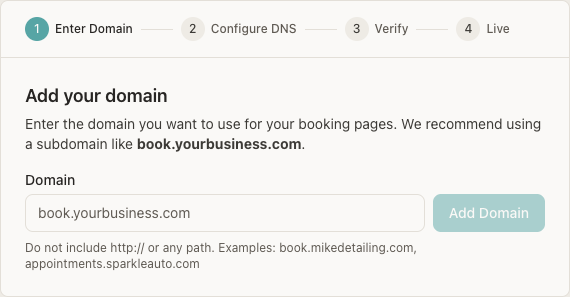
Open Custom Domain
Go to Settings > Custom Domain and click Add Domain.
Enter Domain
The heading is Add your domain. The Domain box is the only choice. Type book.yourbusiness.com (the recommended subdomain), or type www.yourbusiness.com in that same box. There is no separate switch. Do not include http:// or a path. The examples under the box are book.mikedetailing.com and appointments.sparkleauto.com.
Add the CNAME
The page shows one record. Type is CNAME. Host / Name is the first label: book, or www. Value / Target is domains.bookingmachine.io.
Click I've added the DNS record
BookingMachine checks the CNAME, then issues the SSL certificate. Status moves from Pending to DNS Verified, then Active.
Choose what the domain shows
When the page says Your domain is live!, pick Microsite or Booking Widget and click Save Content Settings.
The DNS record
Copy the row on your Custom Domain page. The target is always domains.bookingmachine.io. The host is whatever you typed in front of the domain:
| Type | Host / Name | Value / Target | Example hostname |
|---|---|---|---|
| CNAME | book | domains.bookingmachine.io | book.dcblack.co.uk |
| CNAME | www | domains.bookingmachine.io | www.yourbusiness.com |
Leave every other DNS record alone, including the records that deliver your email.
Cloudflare
In DNS > Records, click Add record. Set the type to CNAME, the name to the host shown (book or www), and the target to domains.bookingmachine.io. Set Proxy status to DNS only (the grey cloud), then Save. The orange cloud must stay off so the certificate can be issued.
Verification and SSL
After you click I've added the DNS record, the page checks two things:
DNS Verification - CNAME record verified successfully once the record is visible.
SSL Certificate - stays on Pending DNS verification until the CNAME checks out, then shows Provisioning SSL certificate... This may take a few minutes. Active means SSL certificate active.
The page checks about every 10 seconds. If that stops, click Check DNS. DNS often updates in a few minutes and can take up to 24-48 hours. The badge on the domain list is Pending, DNS Verified, Active, Failed, or Suspended.
What visitors see
Under What should this domain show?, choose one and click Save Content Settings. The page then lists the real addresses for that hostname.
Microsite - the business page, with services, reviews, gallery, and booking. For www.yourbusiness.com those are https://www.yourbusiness.com/ , /book , and /reviews.
Booking Widget - the booking flow at the root of that hostname. If you have more than one widget, Which widget? includes Default (Main).
Your bookingmachine.io links keep working. The custom domain is an extra address. See Business microsite for the page itself, and Email domain setup if you also want customer email to come from your domain.
Can I use www instead of book?
Yes. Add www.yourbusiness.com. Host / Name is www, and the target is still domains.bookingmachine.io. A booking name such as book.dcblack.co.uk uses the host book. Same record, different host.
Can I point the bare domain itself at BookingMachine?
Use book. or www. in front of it. The record is a CNAME on that host. Putting it on the bare domain would collide with the address and mail records already there.
Why must the Cloudflare cloud be grey?
Proxy status has to be DNS only. An orange proxied cloud hides the CNAME from the certificate check, so the domain does not become Active.
Still have questions? Contact support