Help Center
Getting Started
Core Features
Payments & Analytics
Settings
Team & Scheduling
Integrations
White-Label
Setup
Widget Setup
Build booking, order, or quote widgets: theme, services, payments, and share codes.
Open Widget Setup from the Setup section of the sidebar. This is the builder. The short embed snippet for websites is also covered in Widget & Embedding.
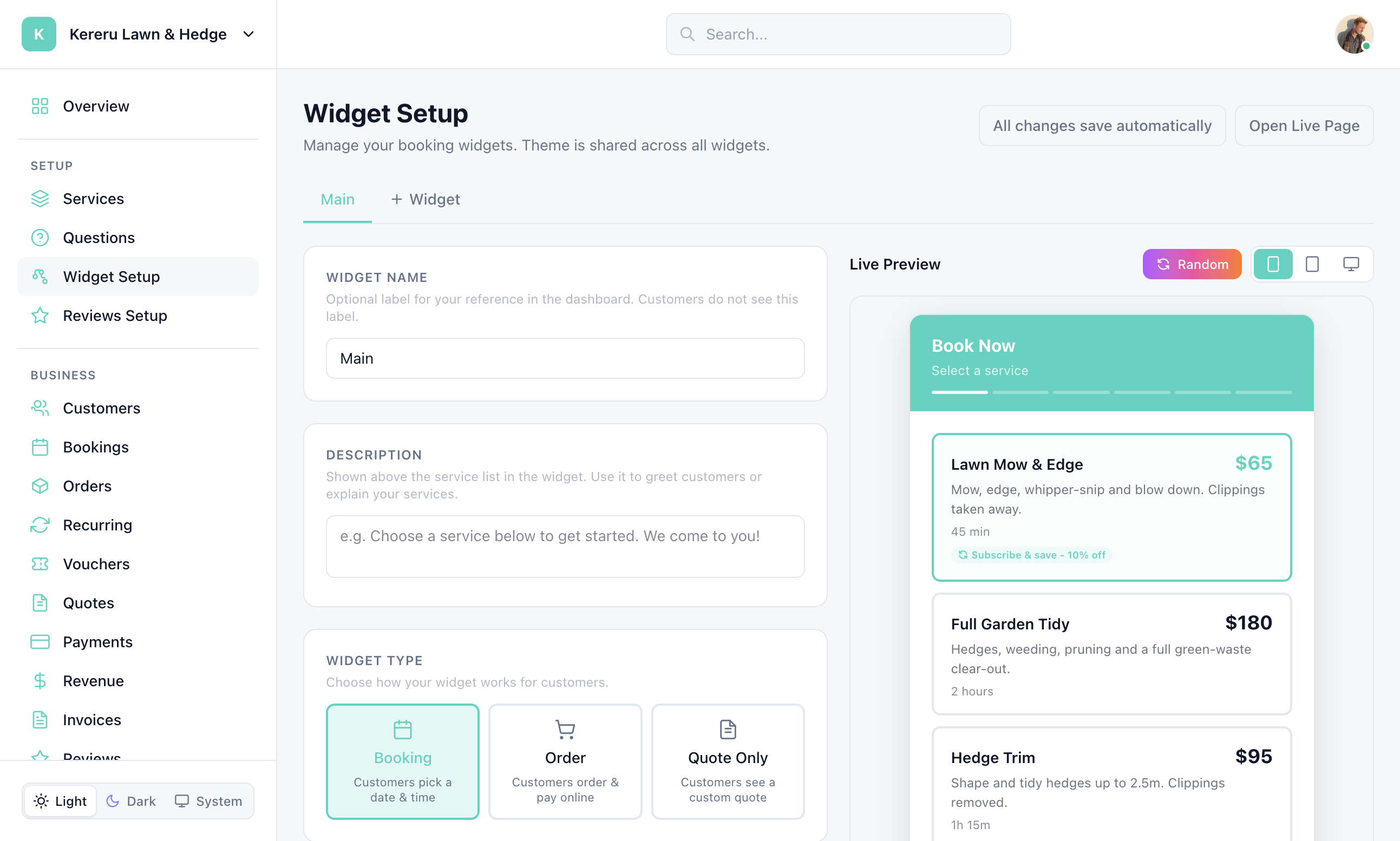
Widget types
| Label | What the customer does |
|---|---|
| Booking | Customers pick a date & time |
| Order | Customers order & pay online (no time slot) |
| Quote Only | Customers see a custom quote |
Open Widget Setup
Click Widget Setup in the sidebar.
Pick or add a widget
Switch between widgets with the tabs. Click + Widget (title “Add widget”) to create another, up to your plan limit.
Choose Booking, Order, or Quote Only
This controls whether customers pick a time, place an order, or request a quote.
Configure the flow
Select services, deposit/payment, confirmation, team and location options, questions, agreements, vouchers, and booking instructions.
Design and share
Set the look on the Design tab (see below). Copy the embed or share link from the share panel.
Design and theme
Open the Design tab next to Settings (on a smaller screen it sits below the preview). There is one theme for the whole workspace: every widget, your booking page and your website booking form use it. The preview updates as you go.
Quick themes set everything at once from eight ready-made looks. Random shuffles through generated ones. Either is a starting point: change any setting afterwards.
| Setting | Options | What it changes |
|---|---|---|
| Colors | Primary, Background, Text, Border | Primary is your brand colour: buttons, the chosen date and time, and open days on the calendar. Text is the colour of the wording, and Border outlines boxes and fields. |
| Buttons | Filled, Outline, Gradient | The style of Continue, Book and the other main buttons. Gradient takes two colours and an angle. |
| Corner radius | Sharp, Round, Soft | How rounded the buttons are. |
| Layout mode | Rounded, Flat | The corners of the widget card itself. |
| Header style | Colored, Gradient, Minimal, None | The band at the top with your name and logo. Minimal keeps it on the background colour; None hides it. |
| Items | Row style and corners | How service and location rows look: filled or outlined, and how rounded. |
| Font | System or a web font | The typeface used throughout the widget. |
| Powered by footer | On or off | The small footer link. Depending on your plan you can hide it; if yours does not include it, the toggle shows the upgrade. |
Kept readable for you
The chosen date and time switch between white and dark text, whichever reads better on your brand colour, so they stay legible with a pale brand colour.
On the booking calendar, days that can be booked are highlighted in your brand colour and the rest are faded. A customer can hover over or tap a faded day to see why it is unavailable.
Phone and postcode examples on the forms follow your country in Settings > General, so an Irish business shows an Irish phone number and Eircode.
Still have questions? Contact support