Calendly is everywhere. It's slick, it's easy to share, and it does one thing very well: letting people book a slot in your calendar. But if you run a cleaning company, a salon, a trades business or any other service where you actually show up and do the work, a meeting-scheduling link leaves a huge gap. No deposits. No card-on-file. No way to protect yourself when someone ghosts you on the day. This page breaks down what service businesses actually need from booking software, where Calendly stops short, and what a purpose-built alternative looks like.
What Calendly Was Built For (and What It Wasn't)
Calendly was designed for professionals who book meetings: sales calls, discovery calls, HR interviews, demos. In that context, it is genuinely excellent. You share a link, someone picks a time, a calendar invite lands in both inboxes. Done.
The problem is that a meeting and a service appointment are completely different things. If a prospect skips a sales call, you lose 30 minutes. If a client cancels your cleaner on the morning of the job, you lose a full day of revenue, plus any materials or travel already committed. The stakes are not the same, and the software needs to reflect that.
Calendly has no native deposit collection at the point of booking. It has limited cancellation policy enforcement. And it has no way to automatically chase clients for reviews after the job is done. For a service business, those are not nice-to-haves. They are the basics.
The Real Cost of No-Shows for Service Businesses
A 2023 study by Software Advice found that no-shows cost small service businesses an average of 20% of their scheduled revenue every month. For a sole trader charging £400 a day, that is £1,600 a month walking out the door.
The single most effective way to cut no-shows is to take a deposit at the time of booking. Once a client has skin in the game, they either turn up or they forfeit something. Scheduling tools that skip the payment step remove exactly that friction.
Holding a card on file is the next best thing. Even if you do not charge upfront, knowing a cancellation fee will be applied keeps clients honest. Both approaches require booking software that treats payments as a core feature, not an afterthought.
No-shows cost small service businesses around 20% of monthly revenue on average
Deposits at the time of booking are the single biggest reducer of last-minute cancellations
Card-on-file policies enforce cancellation fees without awkward conversations
Scheduling-only tools like Calendly offer none of these protections natively
What Service Businesses Actually Need from Booking Software
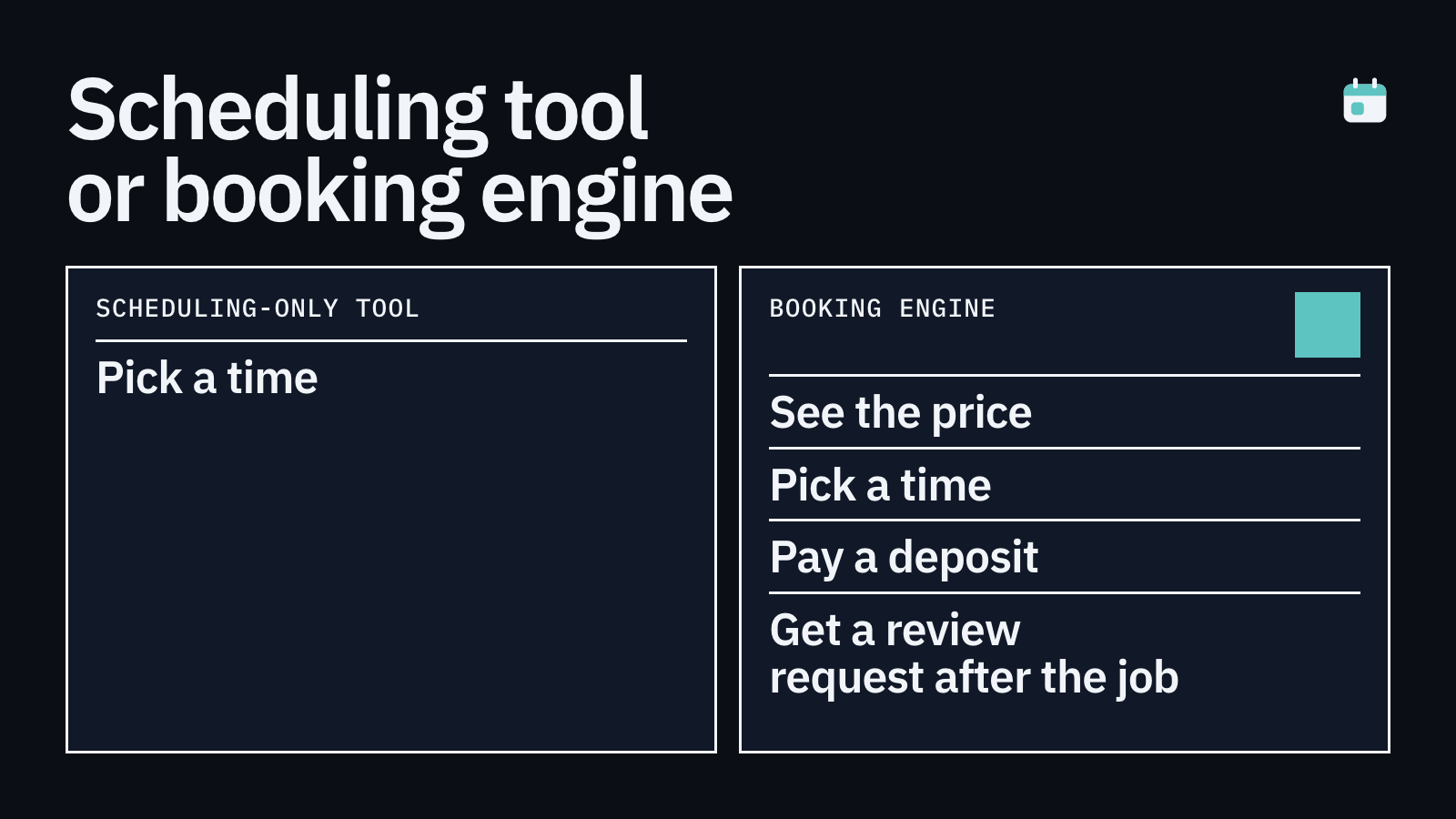
Think about the full lifecycle of a service booking. A client finds you, checks your availability, books a slot, pays a deposit, receives reminders, turns up on the day, gets the work done, and then, ideally, leaves you a glowing review with a photo of the finished result. Calendly handles roughly the middle part of that journey and nothing else.
Here is what a service business booking tool needs to cover across that full journey.
Embeds directly on your existing website so clients never leave your brand
Collects a deposit or full payment at the point of booking
Stores a card on file and enforces your cancellation policy automatically
Requests reviews after the job is completed, including photo and video uploads
Displays those reviews on your website to build trust with new visitors
How BookingMachine Fills the Gap
BookingMachine was built specifically for service businesses: cleaners, tradespeople, salons, personal trainers, freelancers and anyone else who shows up, does the work, and needs protecting when clients do not.
The widget embeds on any website in a few lines of code. Clients book, pick a slot, and pay a deposit before the booking is confirmed. No deposit, no booking. That single step alone removes the majority of time-wasters and last-minute cancellations.
Cancellation policies are set by you and enforced automatically. If a client cancels inside your no-cancellation window, the deposit is held or the card on file is charged. No awkward phone calls, no chasing invoices.
After the job is marked complete, BookingMachine sends an automated review request by text. The link takes the client straight to a simple review page where they can leave a star rating, write a comment, and upload photos or a short video of the finished work. Those reviews can then be displayed directly on your website, giving new visitors the kind of social proof that converts browsers into bookings.
Who Is a Good Fit for BookingMachine?
BookingMachine works best for service businesses that book appointments or jobs in advance, charge per visit or per project, and want to protect their time and income. If any of the following sounds familiar, it is worth a look.
It is not the right tool if you run a pure e-commerce store, need complex enterprise integrations, or simply want a free link to share for video calls with no payment involved.
You take bookings for a service: cleaning, landscaping, beauty, trades, coaching, photography
No-shows or last-minute cancellations are costing you real money
You want to charge a deposit or holding fee at the time of booking
You are frustrated that Calendly or Acuity does not handle deposits properly
You want to automate your review collection and display reviews on your site
Making the Switch: What to Expect
Switching booking tools sounds painful, but in practice it is a few hours of work at most. You set up your services, your availability, your deposit amount and your cancellation policy. Then you paste the embed code onto your website. Existing clients can be pointed to the new booking page, and the automated flows handle the rest.
The review request automation is particularly quick to set up. Once you mark a job as complete, a text goes out automatically. You write the message once and it runs indefinitely. Many BookingMachine users report getting more reviews in their first month than in the entire previous year, simply because the request goes out at exactly the right moment with a frictionless upload link.
How it compares
| Feature | Calendly | Acuity Scheduling | BookingMachine |
|---|---|---|---|
| Built for service businesses | No (meetings focus) | Partial | Yes |
| Deposit collection at booking | No | Limited | Yes, core feature |
| Card-on-file and cancellation enforcement | No | Limited | Yes, automated |
| Embeds on your website | Yes | Yes | Yes |
| Automated post-job review requests | No | No | Yes (text with link) |
| Photo and video review uploads | No | No | Yes |
| Display reviews on your website | No | No | Yes |
| No-show protection policy | No | Basic | Yes, fully automated |
| Pricing model | Per seat / month | Per month | Per month, no per-seat fee |
Can I use Calendly if I want to take deposits?
Calendly has some payment integrations, but deposit collection at the point of booking, with hold or charge on cancellation, is not something it handles natively. You typically need to bolt on separate tools, which creates friction for clients and admin work for you. A purpose-built alternative like BookingMachine handles deposits and cancellation policies as core features.
What types of service businesses use BookingMachine?
Cleaners, window cleaners, landscapers, personal trainers, salon owners, freelance photographers, trades businesses and consultants are among the most common users. Essentially any business that books appointments or jobs in advance and needs to protect against no-shows.
How does the no-show protection actually work?
When a client books, they either pay a deposit upfront or have their card stored on file. You set a cancellation window, for example 48 hours. If they cancel inside that window, your policy is applied automatically. No manual chasing required.
Do clients have to download an app to book?
No. The BookingMachine widget lives on your website. Clients book directly from your site in their browser, pay by card, and receive a confirmation. No app, no account creation on their side.
How do the automated review requests work?
When you mark a job as complete, BookingMachine sends a text message to the client with a review link. The link opens a simple page where they can leave a rating, write a comment, and upload photos or a video of the finished work. You can then display those reviews on your website.
Is BookingMachine only for UK businesses?
BookingMachine supports UK-based service businesses and uses £ for pricing examples, but it works for service businesses in other English-speaking markets too. Check the pricing page for currency and payment processor availability in your region.
How is BookingMachine different from Acuity Scheduling?
Acuity is closer to a service-business tool than Calendly, but its deposit and cancellation enforcement features are limited compared to a product built around no-show protection. BookingMachine also adds automated text-based review requests with photo and video upload, which neither Calendly nor Acuity offers.
Stop Losing Money to No-Shows
BookingMachine takes deposits at the point of booking, enforces your cancellation policy automatically, and chases reviews for you after every job. Set up takes less than a day. Try it free and see how many no-shows you can cut in your first month.